 Move Shoot Move
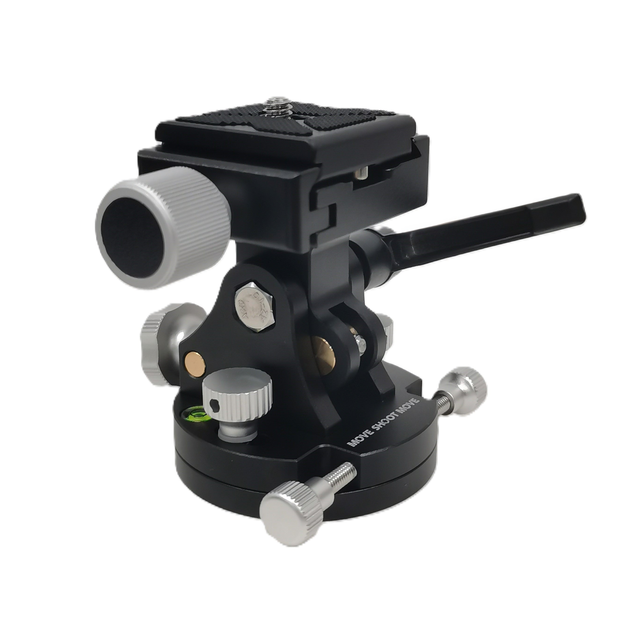
Wedge for precise polar alignment
USD 88.98
Description
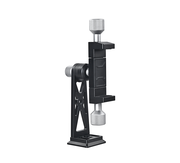
Technical Data GENERAL TECHNICAL DATA Color: Black Material: CNC-Milled Aluminum Alloy Adjustment: 0°-60° Compatibility: Any Rig with ARCA Swiss on the Bottom DIMENSIONS & WEIGHTS Total height: 77.5 mm Base diameter: 58.8mm Net weight: 0.70 pounds (318.2 g) Maximum load: 11 lbs (5 kg) Arca Swiss Plate: Included Screw Hole on the bottom: 3/8 Screw Hole Compatibility: This wedge is compatible with the MSM Rotator, NOMAD tracker, and Seestar. To attach the Seestar to the wedge, you'll need to obtain a 3/8'' to 1/4 screw adapter or 1/4" female - to - 3/8" male conversion adapter. For more detailed information, please refer to this video guide: Description The MSM Wedge is designed for precise polar alignment, similar to a ballhead but with finer adjustment capabilities. It features four knobs and one handle, for multi-directional adjustments, allowing you to set your tracker or camera at various angles. On top of the Quick-Release Plate has a standard 1/4"-20 threaded screw so that you can attach anything with a 1/4"-20 threaded screw upon it. Knob A Lock or Unlock the Quick-Release Plate on the top Knob B & Handle: Knob B controls the altitude adjustment. The handle locks and unlocks the altitude adjustment when turned in the direction of Knob B or the opposite direction, respectively. Simply pull the handle out to adjust its direction and this action will not affect the locked or unlocked status. Knob C & Knob D adjust the azimuth for precise left and right movements in tiny increments. The wedge can securely mount the Nomad Star Tracker without more tools. Made entirely of black CNC-milled aluminum alloy, it ensures maximum stability and durability. Setting up the Wedge 1. Mount the Wedge on the Tripod: - Ensure the wedge is tightly mounted to the tripod for stability. 2. Attach the Quick-Release Plate: - Screw the Quick-Release Plate into the bottom of your rig (e.g., camera, MSM Star Tracker, or others.) -Tip: Nomad Tracker has a built-in arca plate, so it can pass this step. 3. Secure the Rig: - Loosen the Quick-Release Adapter and slide in the Quick-Release Plate, then tighten it. 4. Adjust the Wedge: Tilting: - Loosen the handle (turn in the opposite direction of Knob B) to unlock altitude adjustment. - Tilt the wedge by rotating Knob B, then lock it by turning the handle towards Knob B. - Tip: Slight tilting is possible even when the handle is locked, the main purpose of this handle is to stabilize the whole wedge but not totally lock it. Panning - Use Knob C and Knob D to adjust the azimuth. - To pan the wedge left or right, turn both knobs towards you or outwards simultaneously, which means you need to rotate both screws in the same direction to pan the wedge - Tip: Continue turning the knobs until one reaches its limit; this will allow further panning. - To lock the wedge in place, turn both knobs at the same time towards the center. - To unlock, turn both knobs simultaneously outwards. By following these steps, you can ensure precise adjustments for optimal positioning of your tracker or camera. The combination of altitude and azimuth controls allows for highly accurate alignment, making your astrophotography setup both versatile and reliable. ------------------------------------------------------------------- Hi Friends, The wedge you are asking for finally comes, Dimension: 4.25 x 3.15 x 3.85 inches (10.8 x 8.2 x 9.8 cm) Item weight: 1.16 pounds (0.53 Kg) Material: CNC-Milled Aluminum alloy Sliding stopper on the plate as a safety lock Handle to lock the Wedge after position adjustment Maximum load: 11lbs(5kg) How to use it? There you go! For more details, please check here: https://www.moveshootmove.com/blogs/faqs-in-general/how-to-use-the-new-wedge
Get a discount on Wedge for precise polar alignment
You could save on Move Shoot Move Wedge for precise polar alignment with a Move Shoot Move promo code:
10% off
worked about 1 month ago